



It’s the first week of June, and the school year just ended. Your teenager has football camp, a part-time job starting in July, swimming twice a week, and roughly zero interest in telling you where they need to be or when.
You’re already two days in and you’ve already had the conversation: “Wait — what time do I need to pick you up?”
Summer is supposed to be the easy part. But for most families, it’s actually when scheduling chaos peaks. School provides rhythm; summer doesn’t. And according to a 2025 survey by the Kids Mental Health Foundation, half of parents are just as worried about their child’s wellbeing during summer as they are during term time — with 34% citing lack of structured activities as one of their top concerns, and 86% of parents expecting summer 2025 to be busier than last year.
The fix isn’t tighter control. It’s better visibility. Here’s how to keep track of your kids’ summer schedule — and actually stay on top of it.
Why Summer Scheduling Is Harder Than the School Year
During term, there’s a predictable rhythm: same classes, recurring homework, a timetable that mostly repeats. Parents have a reliable baseline.
Summer blows that up. Now you’re managing a different combination every week: camp Monday to Thursday, a work shift that changes, a driving lesson on Wednesday, a tournament that moved to Friday. Nothing repeats. Everything needs to be communicated from scratch.
The result? You find out about things last minute, you’re constantly asking, and the asking creates friction. Teenagers don’t volunteer logistics. Parents don’t have visibility. Everyone ends up frustrated.
Research consistently backs this up: structure during summer reduces anxiety and improves emotional wellbeing for children and teens — but it has to be self-driven to stick. A schedule imposed by a parent is resisted. A schedule the teenager manages themselves, that a parent can simply see, is a completely different dynamic.
That distinction is exactly what MyStudyLife was built around.
The Xtra Planner: Built for Everything That Isn’t School
Most people know MyStudyLife as a student planner for classes, homework, and exams. But there’s a feature called Xtra that was designed specifically for everything else — and in summer, that means everything.
Xtra lets students add non-academic commitments directly into the same app they use for school:
- Summer jobs and shift work
- Sports practices, trials, and tournaments
- Summer camps — day camps, residentials, intensives
- Volunteering and community activities
- Driving lessons, tutoring, enrichment courses
- Social plans worth remembering
Everything lives in one place, alongside their academic schedule. No separate app. No whiteboard. No group chat with 47 unread messages.
When your child adds a football camp to Tuesday morning, or a café shift to Friday evening, it sits right next to their biology revision and their upcoming exam. The full picture, in one place. For students juggling a genuinely busy summer, this alone is a game-changer — you can learn more about how MSL+ supports students across their whole academic and personal life here.
Where Family Connect Comes In
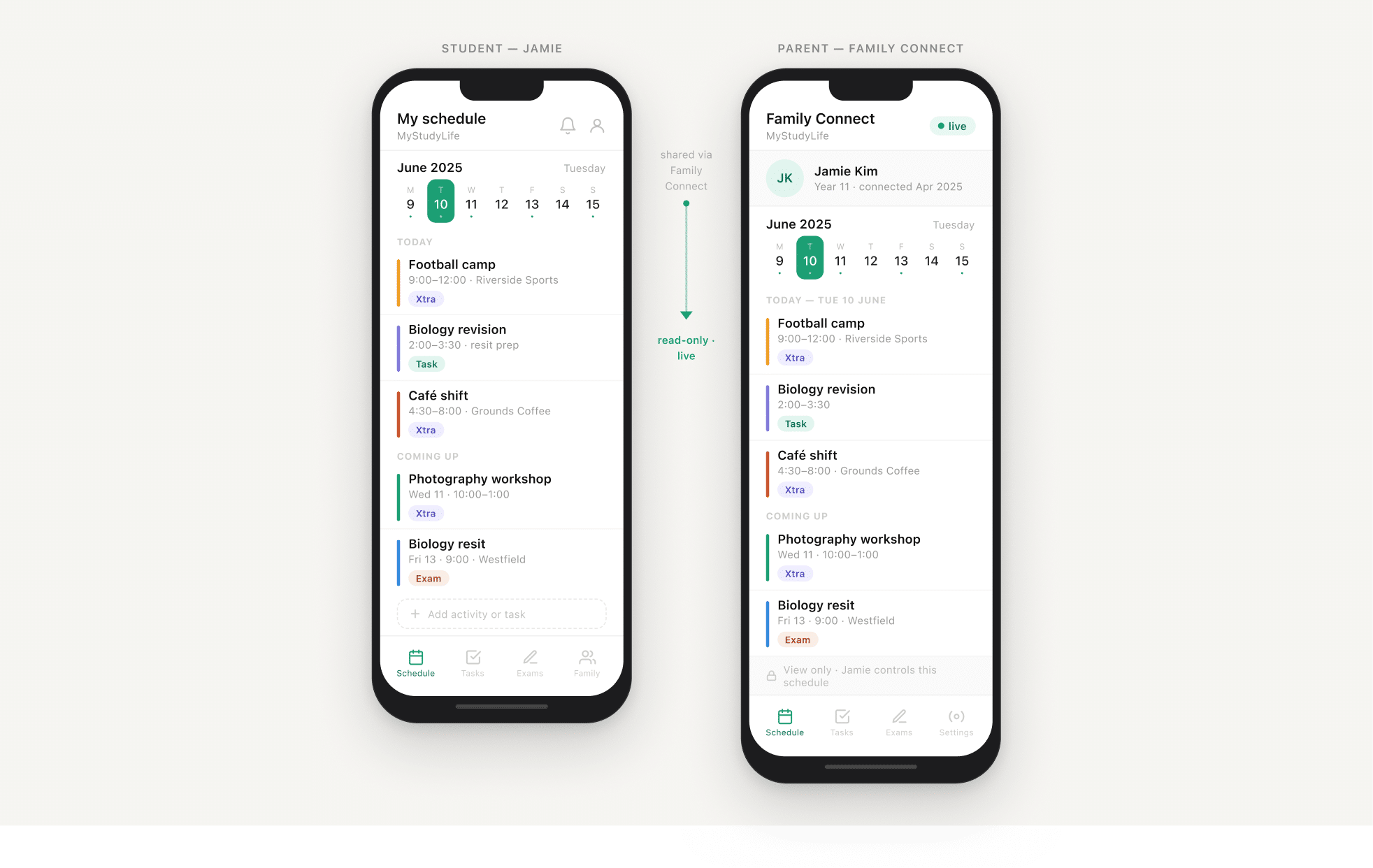
Here’s the part that changes things for parents.
With Family Connect, your child can share their full MyStudyLife schedule with you — Xtra activities included — giving you a live, read-only view of what they have on, on any given day.
You don’t get control. You don’t get to edit. You get visibility.
That distinction matters, especially with teenagers. The app is theirs. They manage it. But they’ve opted to share it with you — which means when they add camp to Wednesday and a work shift to Saturday, you see it without having to ask.
No group chat. No repeated “hey, what time do you need to be there?” Just a calm, shared view of the summer as it actually stands.
What This Looks Like for Real Families
The packed-schedule teen. Your 16-year-old has a café job (variable shifts), football three times a week, and a college prep course in July. You need to coordinate the car. Instead of a negotiation every morning, you check their Xtra schedule the night before and plan around it.
The summer camp rotation. Your 13-year-old is doing three different camps across the summer on alternating weeks. You can never remember which week is which. They add each one to MyStudyLife. You see the calendar update. Done — no more digging through emails to find the confirmation.
The “I told you!” argument. Your child swears they told you about Saturday’s tournament. You have no memory of this. With Family Connect, either it’s in the app — in which case you can see it — or it isn’t. Either way, there’s a record.
Spotting the brutal week early. Three exams, a camp, and a social commitment all in the same week, two weeks out. With visibility into the actual schedule, you can help your child plan around it — or at least make sure nothing else gets added to an already-full plate.
The Structure vs. Freedom Balance
There’s a real tension in summer parenting with older kids: you want some structure and accountability, but you also know that treating a 16-year-old like they’re in Year 7 will go badly.
MyStudyLife threads this needle. The student manages the schedule. They decide what to add, and they decide whether to share with a parent. You get a window in, not a lever.
This is important. Psychologists consistently note that the goal of a summer routine isn’t control — it’s rhythm. Enough structure that kids feel grounded and purposeful; enough freedom that they can actually enjoy the season. A shared app that a teenager runs themselves supports that goal in a way a parent-imposed schedule never can.
Getting Set Up in Under 10 Minutes
- Your child downloads MyStudyLife — free on iOS, Android, and web. Already using it for school? Skip straight to step 2.
- They add summer activities via Xtra — camps, jobs, sports, anything with a date and time.
- They send you a Family Connect invite from inside the app.
- You download the Family Connect companion app and accept the invite.
- You now have a live, read-only view of their schedule — updating whenever they add or change something.
That’s it. Five steps, ten minutes. Less time than one “what do you have on this week?” conversation.
Frequently Asked Questions
Does my child have to be a student to use it over summer? No. MyStudyLife works year-round. The Xtra planner is specifically designed for non-academic commitments, which makes summer an ideal time to start.
What if my child doesn’t want to share? Family Connect is always opt-in — your child sends the invite. If they’re reluctant, that conversation is often more valuable than the feature itself. Most teenagers come around when they realise it means fewer questions, not more surveillance.
Can I add things to their schedule? No — parents have read-only access. This is by design, and it’s why teenagers are generally willing to share.
Does it work for university students? Yes. MSL is used by secondary school and university students alike, and many university students use Family Connect to keep parents informed without the weekly check-in text.
The Bottom Line
Summer chaos isn’t inevitable — it’s mostly an information problem. Your child’s schedule exists somewhere: in their head, in a dozen texts, in a confirmation email no one can find. MyStudyLife gives them one place to put all of it, and Family Connect gives you a quiet window in.
Less asking. Less friction. More of the summer everyone actually wanted.
Download MyStudyLife free → — iOS, Android, and web. Set up Family Connect in under 10 minutes.


