



The weeks before a new school year are a scramble. Supply lists, schedule changes, forgotten assignments, and the annual negotiation over screen time all arrive at once. What’s changed recently is that the same technology parents worry about—artificial intelligence—has quietly become one of the most useful tools for getting a household organized before the first bell rings.
This guide walks through practical, parent-tested ways to use AI for back-to-school preparation. It’s written for the parent who wants their child organized and independent, not the parent who wants to do the organizing for them. That distinction matters, and we’ll come back to it.
Why AI Belongs in Your Back-to-School Toolkit
For years, “get organized for school” meant a paper planner, a wall calendar, and a lot of nagging. Those tools still work, but they put the entire cognitive load on the parent. You become the reminder system, the deadline tracker, and the person who notices at 9 p.m. that a project is due tomorrow.
AI shifts that load. Modern student planning apps use AI to read a class schedule from a photo, break large assignments into manageable steps, and predict when a student is heading toward an overloaded week. Instead of you catching problems, the system catches them—and often catches them earlier than a human would.
The goal isn’t to replace your involvement. It’s to change what your involvement looks like: less firefighting, more coaching.
Start With the Schedule: Let AI Do the Data Entry

The single most tedious part of back-to-school setup is transferring a class timetable into something usable. Most families never do it, which is exactly why the first month feels chaotic.
This is where AI removes almost all the friction. Tools like MyStudyLife include an AI schedule scanner that lets your child photograph a printed or emailed timetable and have it converted into a structured digital schedule automatically. Rotating timetables, block scheduling, week A/week B systems—the kinds of formats that break simple calendar apps—are handled without manual entry.
For a parent, this is a five-minute win with an outsized payoff. Once the schedule exists digitally, everything else (reminders, homework tracking, exam countdowns) has something to attach to.
Parent tip: Sit with your child for this one setup step, then hand it off. The act of scanning their own schedule gives them ownership. If you do it for them, it becomes your system, not theirs.
Use AI to Break Down Overwhelming Assignments
Older students, especially those transitioning to middle or high school, hit a wall when assignments stop being “one worksheet” and start being “a research project due in three weeks.” Many kids genuinely don’t know how to break a large task into steps—it’s a skill, not an instinct.
General-purpose AI assistants and purpose-built study tools can help a student turn a vague assignment into a sequence of smaller deadlines. A prompt as simple as “Help me break this book report into daily steps before the due date” produces a realistic plan. The student then loads those steps into a task manager built for students so the plan becomes a set of tracked tasks rather than good intentions.
The parenting move here is to teach the workflow once and then step back. You’re not doing the breakdown—you’re showing them that breakdowns are possible.
Set Up Smart Reminders That Reduce Nagging
Every parent knows the loop: you remind, they forget, you remind more sharply, they resent it, nothing improves. AI-driven reminders break the loop by moving the reminding function out of your voice and into a neutral system.
Good student planners now send notifications based on workload, not just due dates. If three assignments and a quiz land in the same 48 hours, the app can flag the crunch days in advance so your child sees the collision coming. Research on academic organization consistently shows that students who track deadlines externally—rather than relying on memory—perform better and report less stress. AI simply makes that external tracking effortless.
When the reminders come from an app your child set up, compliance goes up and conflict goes down. You get to be the parent again instead of the alarm clock.
The Parent’s Real Job: Coaching Independence
Here’s the part most “AI for school” advice skips. The measure of a good back-to-school system isn’t how organized you are. It’s whether your child can run the system without you by October.
AI makes this handoff realistic for the first time. Because the tools do the heavy lifting—data entry, breakdowns, reminders—a ten-year-old can maintain a planning system that used to require an adult. Your role becomes reviewing, not running.
A practical rhythm that works for many families:
- Weekly check-in. Once a week, sit together for ten minutes and look at the upcoming week in their planner. You’re reviewing, not managing.
- Ask, don’t tell. “What’s your biggest deadline this week?” beats “Don’t forget your essay is due Thursday.” The first builds the skill; the second replaces it.
- Let small failures happen. A missed low-stakes assignment in September teaches more than a rescued one. The system will surface the pattern; let your child feel the consequence while the stakes are low.
Parents who use AI tools to coach independence raise more capable kids than parents who use the same tools to enforce compliance. Same technology, opposite outcome.
What About Younger Kids and Families With Multiple Children?
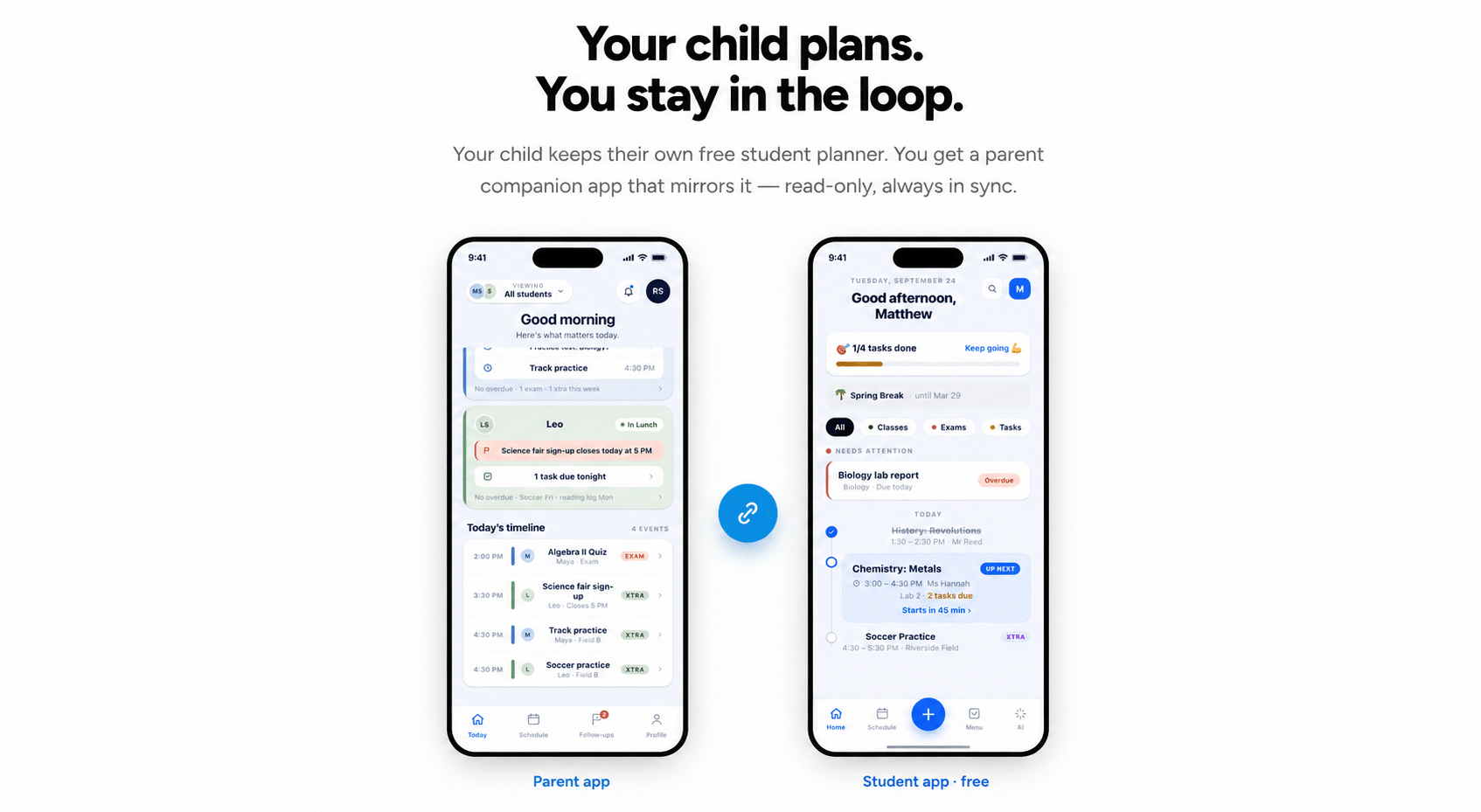
If you’re managing several children across different schools and schedules, the coordination problem multiplies fast. Family-oriented features—shared calendars, parent visibility into a child’s planner, and connected accounts—let you stay informed without hovering.
Tools like MyStudyLife’s Family Connect approach let a parent link to a child’s planner for visibility while the child retains ownership of the day-to-day. You see the shape of their week; they still run it. For households juggling multiple activities, this shared-visibility model prevents the classic failure where two kids have conflicting commitments no one noticed until the morning of.
For younger children who can’t yet run their own system, the AI still earns its place: you set it up once, and it quietly handles the reminders and schedule logic you’d otherwise carry in your head. External guidance from organizations like Common Sense Media can help you decide which tools are age-appropriate for your family.
A Simple Back-to-School AI Checklist for Parents

Before the school year starts, work through this short list with your child:
- Scan the schedule. Use an AI schedule scanner to digitize the class timetable in one step.
- Add fixed commitments. Sports, music lessons, and standing appointments go in alongside classes so conflicts are visible.
- Set notification preferences. Turn on workload-aware reminders so busy weeks surface early.
- Practice one breakdown. Take one upcoming assignment and break it into steps together, so the skill is modeled before it’s needed.
- Schedule the weekly check-in. Pick a recurring ten-minute slot—Sunday evening works for many families—to review the week ahead.
- Agree on the handoff. Decide together what your child owns and what you’ll review. Write it down.
Complete this before the first week of school and you’ll skip the September scramble almost entirely.
The Bottom Line
AI won’t make your child organized on its own—no tool does that. But used well, it removes the tedious parts of staying organized so the actual skill-building can happen. The parents who get the most out of these tools treat them as a coaching aid, not a control panel.
Set the system up together, hand off the daily running, and check in weekly. By the time the first report card arrives, you’ll have something more valuable than a tidy schedule: a kid who can manage their own.
Ready to start? Explore how MyStudyLife’s AI-powered planner helps students build independence—and gives parents peace of mind—this school year.
Related reading: Getting Started With MyStudyLife · The MyStudyLife Blog


