


AI-powered planners can now build your study schedule, scan your timetable, and send smart reminders — all without you touching a spreadsheet. Here are the best options for students in 2026, from free essentials to premium powerhouses.

Planning used to mean writing exam dates in a notebook and hoping for the best. In 2026, the best student planners use artificial intelligence to do the heavy lifting — scanning your timetable from a photo, auto-scheduling study sessions around your classes, and nudging you when a deadline is creeping up.
But with dozens of apps now claiming “AI-powered” features, it’s hard to know which ones are genuinely useful for school and which ones are productivity tools dressed up for a student audience. We tested the most popular options and ranked them based on what actually matters: how well they handle academic schedules, whether the AI features save real time, and how much they cost (because most students aren’t paying $15/month for a calendar).
Here are the best AI school planner apps for students in 2026.
1. MyStudyLife — Best All-Round AI School Planner (Free)
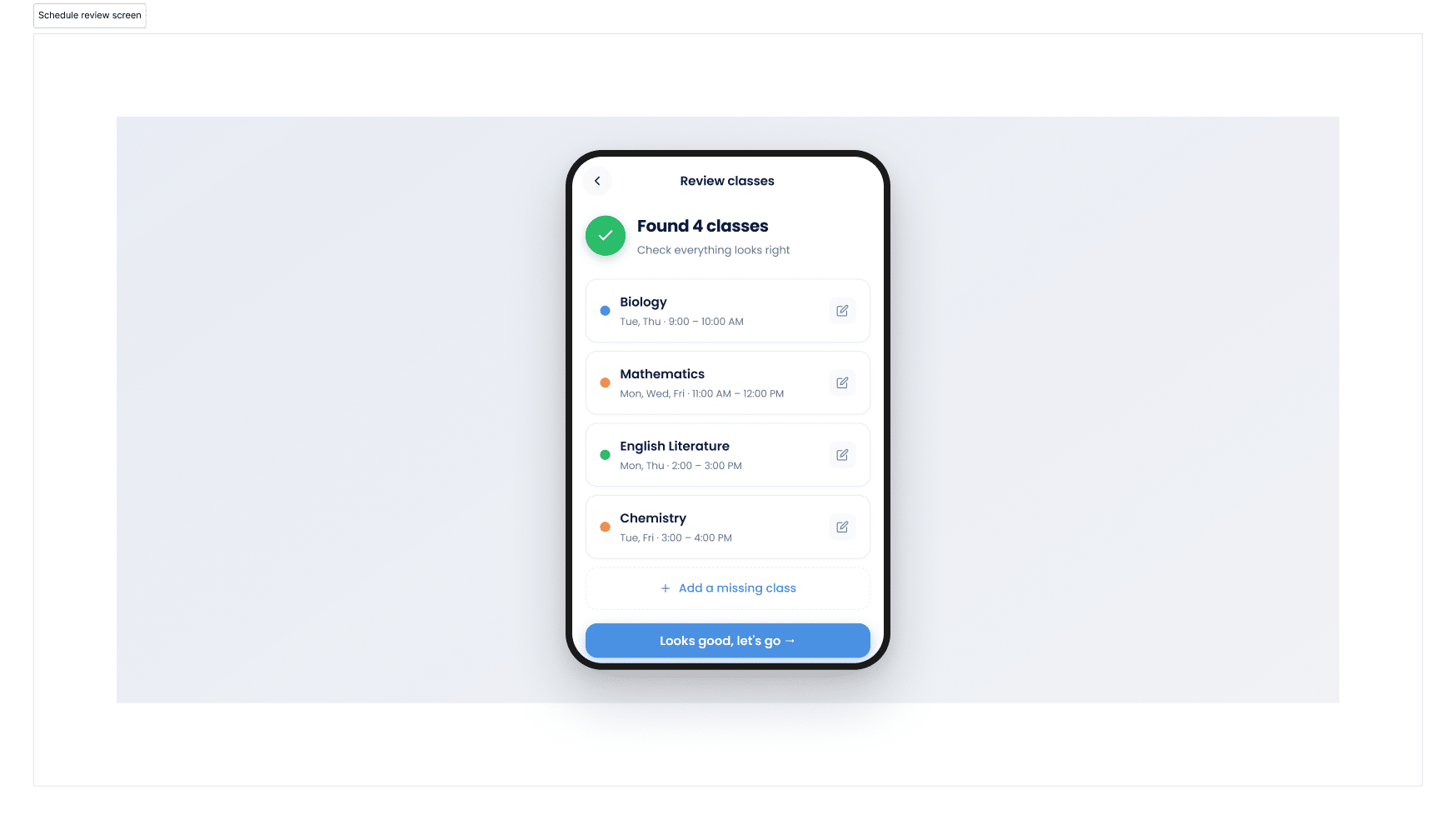
Platforms: iOS, Android, Web Price: Free (MyStudyLife+ premium available) Best for: High school and university students who need a purpose-built academic planner
MyStudyLife is built specifically for students, and that distinction matters more than it sounds. While most planners on this list started as general productivity tools and added student features later, MyStudyLife was designed from the ground up around the academic calendar — rotating timetables, exam tracking, assignment deadlines, and the reality that a student’s schedule doesn’t look like a 9-to-5.
What makes it stand out:
The headline AI feature is AI Schedule Scan, which lets you photograph your school timetable and have it automatically converted into a digital schedule inside the app. No manual entry, no re-typing class names and room numbers. For students starting a new term or semester, this alone saves hours of setup time.
Beyond the AI scan, MyStudyLife covers the fundamentals well. You get a clean calendar view that shows classes, exams, and tasks in one place. The app supports rotating and weekly timetables — a feature that’s surprisingly rare and critically important for students on A/B day schedules, IB programmes, or block rotations. Smart reminders alert you to upcoming deadlines and overdue homework, and a built-in Pomodoro timer helps structure focused study sessions.
The free tier is genuinely generous. You get full access to the planner, calendar, task tracking, and reminders without paying anything. MyStudyLife+ unlocks premium features including subtasks, advanced grade tracking, and enhanced personalisation. There’s also Family Connect, a companion feature that lets parents stay in the loop with their child’s schedule without the daily “what homework do you have?” interrogation.
The verdict: If you want one app that handles your entire academic life — classes, exams, tasks, reminders, and focus tools — without paying a subscription, MyStudyLife is the best starting point. It’s the rare planner that actually understands how school works.
👉 Download MyStudyLife free on iOS, Android, or web
2. Notion — Best for Students Who Want Total Customisation
Platforms: iOS, Android, Web, Mac, Windows Price: Free personal plan (free Plus plan with .edu email) Best for: University students comfortable building their own systems
Notion is less of a planner and more of a blank canvas. Its strength is that you can build virtually anything: a semester dashboard, an assignment tracker with status columns and priority tags, a reading list database, an exam countdown timer, and a daily study log — all linked together in one workspace.
With Notion AI now integrated, you can generate study guides from your notes, summarise lecture content, and ask questions across your own documents without leaving the app. For students with a .edu email, the Plus plan (which includes expanded AI features) is free.
The catch: Notion’s flexibility is also its biggest weakness for students. The setup time is significant. You’re not opening an app and entering your classes — you’re designing a system, choosing database schemas, and linking pages together. Many students spend more time building their Notion setup than actually using it. The workaround is to start with a community template (there are hundreds built for students), but even then, the learning curve is steep compared to purpose-built planners.
Best for: Students who enjoy building systems and want a single tool for notes, planning, and project management. Not ideal for students who just want something that works out of the box.
3. Reclaim.ai — Best AI Auto-Scheduler for Busy Schedules
Platforms: Web (Chrome extension), integrates with Google Calendar and Outlook Price: Free tier available; Starter from $8/month (50% student discount available) Best for: University students and grad students juggling classes, work, and commitments
Reclaim takes a fundamentally different approach to planning. Instead of showing you a calendar and asking you to fill it in, you tell it your goals — “I need 6 hours of chemistry revision this week” or “I want 30 minutes of exercise daily” — and its AI finds the optimal slots in your calendar, working around your existing classes and commitments.
The auto-scheduling is genuinely intelligent. If a meeting gets added or a class is cancelled, Reclaim automatically reshuffles your study blocks to the next best available time. It also defends “focus time” by marking blocks as busy so nothing else gets scheduled over them.
For students, the biggest draw is the 50% education discount, which brings the Starter plan down to around $4/month. The free tier includes basic habit scheduling and up to three smart meetings, which may be enough for students with simpler schedules.
The catch: Reclaim doesn’t understand academic concepts like rotating timetables, exam tracking, or assignment deadlines. It’s a calendar optimiser, not a school planner. You’ll likely need to pair it with a student-specific tool like MyStudyLife for the academic layer and use Reclaim purely for time-blocking study sessions.

4. Structured — Best for Visual Daily Planning
Platforms: iOS, Mac, Apple Watch Price: Free; Pro from $2.99/month or $29.99/year Best for: iPhone/iPad users who want a clean, visual daily timeline
Structured takes a timeline-based approach to your day, letting you visually block out study sessions, classes, meals, and breaks in a way that’s immediately intuitive. Each block sits on a vertical timeline so you can see exactly how your day is distributed — which is particularly helpful for students who struggle with time blindness or over-committing.
The interface is minimal and elegant, and it integrates with Apple Calendar. For students in the Apple ecosystem, it’s one of the fastest ways to plan a study day.
The catch: Structured is Apple-only, which immediately rules it out for a significant chunk of students. It also lacks academic-specific features like timetable support, exam tracking, or grade monitoring. It’s a daily planner, not a school planner — great for structuring individual study days, but you’ll need something else to manage the bigger academic picture.
5. Todoist — Best Simple Task Manager with AI
Platforms: iOS, Android, Web, Mac, Windows Price: Free (Beginner); Pro $4/month Best for: Students who think in to-do lists rather than calendars
Todoist isn’t technically a school planner, but many students use it as one — and its recent AI features make it more capable than ever. You can type tasks in natural language (“finish biology lab report by Friday 3pm”), and Todoist’s AI parses the due date, priority, and project automatically. The Pro plan adds AI-powered task suggestions and smart scheduling.
Its strength is simplicity. Where Notion overwhelms with options and Reclaim requires calendar setup, Todoist just works: add tasks, set deadlines, check them off. The Kanban board view is useful for tracking assignments across subjects, and the integration with Google Calendar means your tasks show up alongside your classes.
The catch: Todoist doesn’t support class timetables, rotating schedules, or exam tracking. It’s a task manager, not an academic planner. Students who only need a homework tracker will find it perfectly sufficient, but those managing a full academic schedule will hit its limits quickly.
6. Eduplanner — Best for Syllabus-Based Planning
Platforms: Web Price: Free tier available Best for: University students who want AI to turn their syllabus into a study plan
Eduplanner’s core pitch is compelling: upload your syllabus document, and the AI automatically generates a customisable study board with all your deadlines, topics, and tasks mapped out. Instead of manually parsing a 15-page course outline, the app does it in seconds.
It also includes an AI chat feature that answers questions about your course material, supports document uploads for interactive study, and can draft emails to professors on your behalf. For university students drowning in syllabi at the start of each semester, the automated setup is a genuine time-saver.
The catch: Eduplanner is web-only, which limits its usefulness for students who want to check their schedule on the go. The AI chat feature, while handy, is a general-purpose assistant rather than a tool trained on your specific course content, so accuracy can vary.

How to Choose the Right AI Planner for You
With this many options, the decision really comes down to what kind of student you are and what problem you’re trying to solve.
If you want one app that does everything school-related for free, start with MyStudyLife. It covers timetables, exams, tasks, and reminders in a single purpose-built package, and the AI Schedule Scan makes setup effortless. It’s the most complete free option for students at any level.
If you want AI to auto-schedule your study time, add Reclaim.ai to your stack. It handles the “when should I study?” question better than any other tool, but you’ll want to pair it with a student-specific planner for the academic layer.
If you love building custom systems, Notion gives you unlimited flexibility — just be honest with yourself about whether you’ll actually use what you build. Starting from a community template is strongly recommended.
If you want the simplest possible setup, Todoist or Structured will get you organised in under five minutes with minimal configuration.
If your school uses rotating timetables or block schedules, MyStudyLife is one of the very few apps that handles this properly. Most general-purpose planners assume a fixed weekly schedule, which breaks immediately for students on A/B day rotations or IB block systems.

The Bottom Line
The best AI school planner is the one you’ll actually open every day. Fancy features don’t matter if the app sits unused on your home screen. For most students, a free, purpose-built academic planner like MyStudyLife will cover 90% of what you need — and the AI Schedule Scan means you can be set up and running within minutes of downloading it.
If your schedule is more complex or you want fully automated time-blocking, layer on a tool like Reclaim.ai. And if you’re a power user who wants total control, build your system in Notion.
Whatever you choose, the goal is the same: spend less time planning and more time actually studying. That’s what AI planners are for.
More Study Planning Resources
Looking for more ways to stay organised this school year? These guides can help:
- Final Exam Study Tips: Strategies to Get Better Grades
- Study Habits That Stick — Build Focus, Productivity & Better Grades
- 10 Ways to Study Effectively
- Midterm Exams: Study Tips and Planner Tools for Success
- Last-Minute GCSE/IGCSE Study Tips


