

MyStudyLife for Schools
Give every student a planner they’ll actually use.
Students already run their school lives on MyStudyLife. Roll it out across a year group, a faculty or the whole school, and give them the organisational habits that carry into university and work.
- No IT project required
- Students keep their accounts for life
- Free for students, always

No new admin
A student tool, not another platform you have to manage
MyStudyLife sits with the student, not in your systems. There is no roster to maintain, no seats to provision and no data migration. Students sign up in a minute, scan their timetable and start planning the same lesson.
- Nothing to install or host, and no IT ticket to raise.
- Works alongside your MIS, VLE and Google or Microsoft accounts.
- Teachers see the benefit without becoming administrators.
Built for student data from day one
GDPR and COPPA compliant, encrypted in transit and at rest, and never sold to third parties.
Features
Every tool a student needs, in one place
One app instead of five: a timetable, a homework tracker, an exam
planner, a focus timer and an AI study partner.
Multi-student control
Switch between children in a tap, or see everyone in one combined view. Up to 5 students on one plan.
Live homework sync
Every assignment and due date flows straight from your child's student planner, no re-typing.
Deadline & grade alerts
Get nudged before an exam, as a deadline nears, or when a grade slips, sent straight to you.
Grades & test scores
See marks for every quiz, exam and assignment the moment they post.
Shared family calendar
Classes, clubs, sports and shifts for every child, laid out day by day.
Private parent notes
Add follow-up flags and notes only you can see. Support quietly, without hovering.
Add & it syncs
Add homework or a study session and it appears on your child's device instantly.
Empower your student
Get an understanding of what they're doing, so you can back them up at the right moment.
Private by design
You can add nudges, but your child controls their own planner, and their private notes stay private.
The difference
Goodbye chaos. Hello control.
The same students, the same timetable, a completely different term.
Before MyStudyLife
- Homework written on the back of an exercise book, or not at all.
- Rotating timetables that nobody can remember on a Monday.
- Revision that starts the night before the exam.
- Deadlines chased by tutors, parents and form teachers.
- Five apps, none of which the students opted into.
With MyStudyLife
- Every deadline captured, with a reminder before it lands.
- The right day, room and teacher on every phone in the room.
- Revision planned back from the exam date, in steps.
- Students who arrive already knowing what is due.
- One app they choose to keep using after they leave.
A term in the life
How a student actually actually uses it
Not a launch event. A habit that fits into the day they already have.
Multi-student control
Switch between children in a tap, or see everyone in one combined view. Up to 5 students on one plan.
Live homework sync
Every assignment and due date flows straight from your child's student planner, no re-typing.
Deadline & grade alerts
Get nudged before an exam, as a deadline nears, or when a grade slips, sent straight to you.
Grades & test scores
See marks for every quiz, exam and assignment the moment they post.
Shared family calendar
Classes, clubs, sports and shifts for every child, laid out day by day.
Private parent notes
Add follow-up flags and notes only you can see. Support quietly, without hovering.
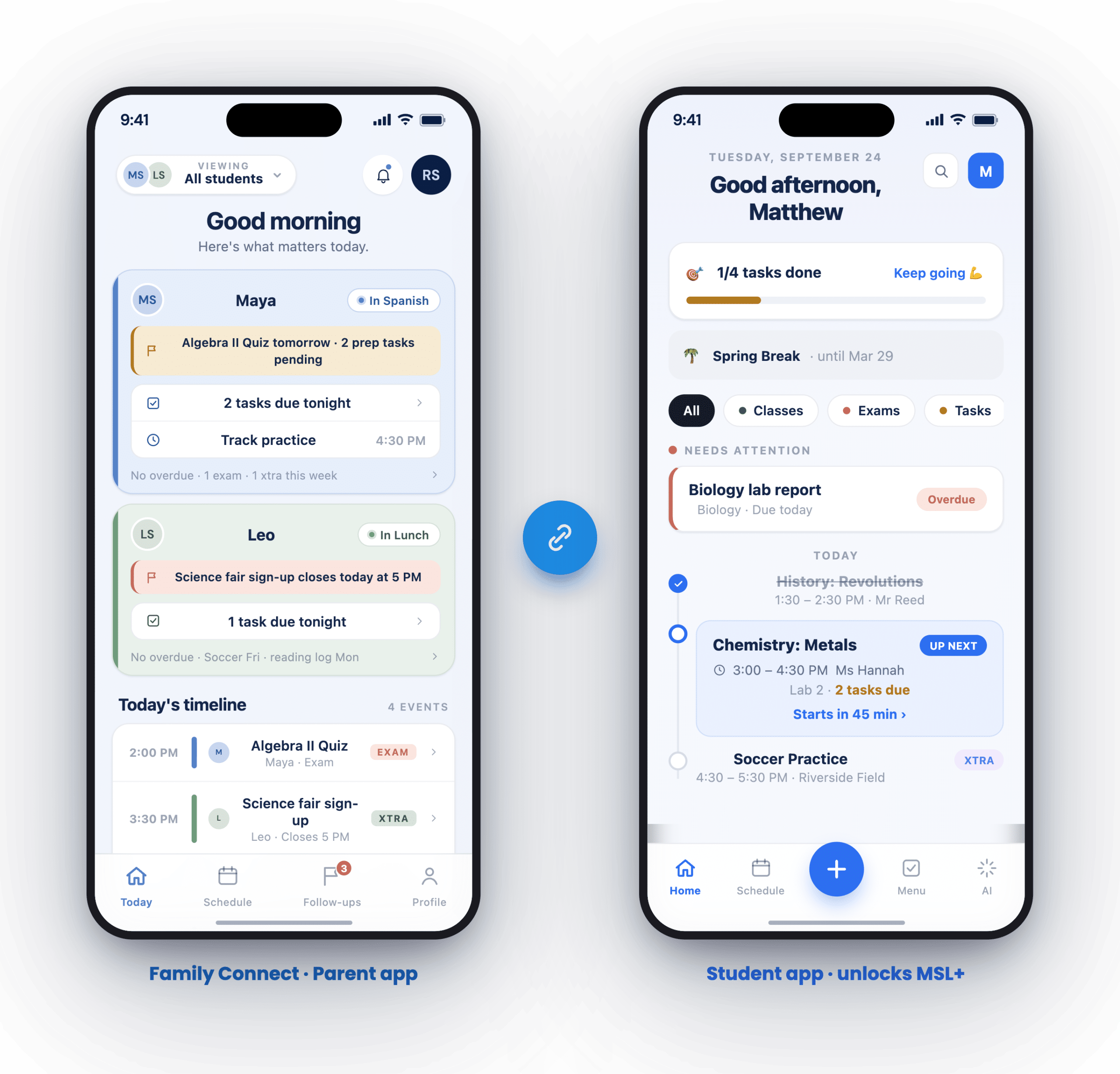
Family Connect
Bring parents into the loop, without extra work for the school
Parents link to their own child’s planner and see the homework, exams and schedule the student is already keeping. Nothing is published by the school, and no one at the school administers the link.
- Parents see upcoming work and exams, and can add tasks or events to help.
- The student approves the link and keeps control of their own planner.
- Fewer “what has my child got due?” emails into the school office.
- One parent account covers up to five students across different schools.
In their words
What students actually say
Adoption is the whole game. These are the students who kept using it after the launch assembly.
MyStudyLife’s calendar keeps all my deadlines in one spot. It’s genuinely cut down my stress.
Daniel K.
University fresher
MyStudyLife’s calendar keeps all my deadlines in one spot. It’s genuinely cut down my stress.
Daniel K.
University fresher
MyStudyLife’s calendar keeps all my deadlines in one spot. It’s genuinely cut down my stress.
Daniel K.
University fresher
MyStudyLife’s calendar keeps all my deadlines in one spot. It’s genuinely cut down my stress.
Daniel K.
University fresher
MyStudyLife’s calendar keeps all my deadlines in one spot. It’s genuinely cut down my stress.
Daniel K.
University fresher
MyStudyLife’s calendar keeps all my deadlines in one spot. It’s genuinely cut down my stress.
Daniel K.
University fresher
Plans
Three ways to bring MyStudyLife to your students
MyStudyLife is free for every student, forever. These plans unlock premium across a cohort and add the support to launch it properly.
Start here
Premium app trials
Hand a year group or a form the full premium experience for a term and see what adoption looks like before you commit.
- Premium unlocked for a named cohort
- Rollout guides and student handouts
- A term to measure uptake
- No commitment at the end
Most schools
Adopt it across the whole school
Every student in the school gets premium MyStudyLife, with the rollout kit and a named contact to help you launch it well.
- Premium for every student on roll
- Teacher and student rollout guides
- Launch slides and assembly material
- A named contact through the first term
- Students keep their account after they leave
Bespoke
Fully commissioned rollout
For groups, trusts and districts that want MyStudyLife shaped around their own calendar, structure and reporting.
- Multi-school and district rollouts
- Your term dates and timetable structures
- Bespoke onboarding for staff
- Direct line to the MyStudyLife team
Support
Real support, not a help-centre redirect
A named contact
One person who knows your school, your calendar and where you are in the rollout.
Materials that are ready to use
Teacher guides, student handouts and launch slides, written for secondary and university.
Answers from the team
Questions go to the people who build the app, not to a queue behind a help article.
For schools and districts
Ready to give your students the planner they’ll actually use?
Tell us about your school and we will show you what a rollout looks like, from the first assembly to the end of term.
schools@mystudylife.com · Free for students, always
